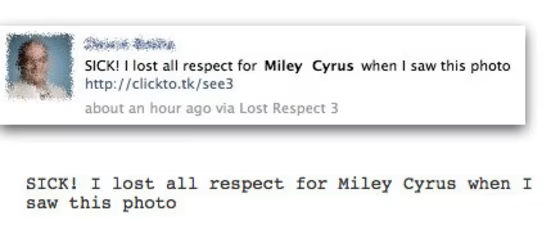
The promise of seeing a provocative photo of Miley Cyrus is turning into a successful Facebook scam.
If you see messages that say, "SICK! I lost all respect for Miley Cyrus when I saw this photo," followed by a large flashing button on the screen imploring you to "CLICK HERE," don't click here. You'll be giving scammers permission to access your personal data and post status messages — which is how this con is spreading. You see a message like this from a friend and you think it's real, so you click.
"We have seen a number of different URLs being used in the messages, but they all redirect to a page which shows a traffic sign-like image of the word 'respect' crossed out in red," wrote Graham Cluley, Sophos senior technology consultant on the company's blog.
It's hard to believe that people would allow this to happen, but if you're desperate to see a picture of Miley Cyrus which will make you lose all respect for her (the mind boggles...) then you may well click further on.
Unfortunately continuing is a mistake, as you will be lead directly to a CPALead survey, which earns the scammers money every time one of their dumb questionnaires is answered.
The scammers only need a few people to complete their survey to make it financially worthwhile to build rogue applications like this — that's why there are so many of them. If only Facebook took a tougher line about the applications it allowed on its network.
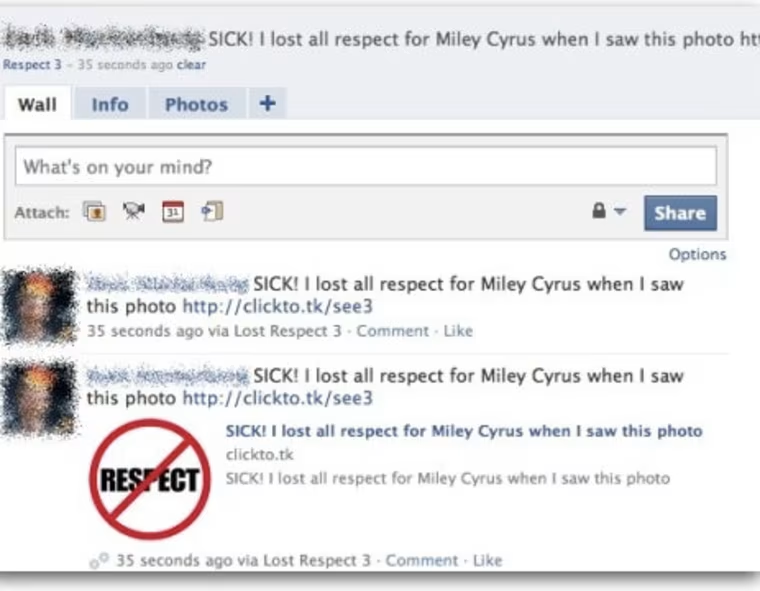
If you did get bitten on this one, Cluley says you can remove references to the scam from your news feed and "revoke the right of rogue applications to access your profile" by going to: Account/Privacy Settings/Applications and Websites.
These kinds of scams and "rogue" Facebook apps will continue, Cluley argues, until the social network takes a "tougher line" against them.







 FOR SUBSCRIBERSA harrowing ordeal aboard an Israel-bound plane







FOR SUBSCRIBERSThe debate over AI’s future rages on both coasts

FOR SUBSCRIBERSA harrowing ordeal aboard an Israel-bound plane
FOR SUBSCRIBERSThe debate over AI’s future rages on both coasts
"What many folks don't realize is that Facebook is much more than a social networking website, it's a platform with over half a million active applications running upon it," he wrote recently.
"Inevitably some of these third-party applications are written with malicious intent — designed to steal information, spread virally, or spam unsuspecting Facebook users. Anyone can write a Facebook application, and it can be made available to the site's over 500+ million users without any vetting by Facebook's security team."
We've contacted Facebook for comment, and will update this post when we hear back.
Update, 3:30 pm ET: Facebook says it has built "numerous defenses to combat spam, phishing, and malware, including complex automated systems that work behind the scenes to detect and flag Facebook accounts that are likely to be compromised (based on anomalous activity like lots of messages sent in a short period of time, or messages with links that are known to be bad)."
Once a phony message is detected, said a spokesperson, "we delete all instances of that message across the site. We also block malicious links from being shared and work with third parties to get phishing and malware sites added to browser blacklists or taken down completely. Users who've been affected are put through a remediation process so they can reset their password and take other necessary steps to secure their accounts."
Facebook also says users can protect themselves by following "a few key" rules:
- Use an up-to-date browser that features an anti-phishing blacklist.
- Use unique logins and passwords for each of the websites you use.
- Check to see that you're logging in from a legitimate Facebook page with the facebook.com domain.
- Be cautious of any message, post or link you find on Facebook that looks suspicious or requires an additional login.
Related stories:
- Halloween death scam spreads on Facebook
- Miley Cyrus Sexy Photo Hacker Avoids Hard Time
- Red Tape:'I thought it was my sister': Woman loses $2,000 to Facebook scam
- Miley tattoo, tweet spark gay rights debate
Check out Technolog, Gadgetbox, Digital Life and In-Game on Facebook, and on Twitter, follow Suzanne Choney.