






 FOR SUBSCRIBERSA harrowing ordeal aboard an Israel-bound plane







FOR SUBSCRIBERSThe debate over AI’s future rages on both coasts

FOR SUBSCRIBERSA harrowing ordeal aboard an Israel-bound plane
FOR SUBSCRIBERSThe debate over AI’s future rages on both coasts
We've heard about plenty of Twitter "hacking" incidents lately — in fact, actor Ashton Kutcher was a recently discussed victim — which could've been prevented if only the microblogging service gave users a simple way to access a more secure version of the site.
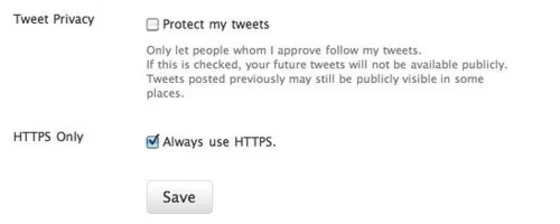
Well, Twitter now allows users to force their Twitter accounts to always use the more secure HTTPS version of the site by changing one little setting:
To turn on HTTPS, go to your settings and check the box next to “Always use HTTPS,” which is at the bottom of the page. This will improve the security of your account and better protect your information if you’re using Twitter over an unsecured Internet connection, like a public WiFi network, where someone may be able to eavesdrop on your site activity. In the future, [Twitter hopes] to make HTTPS the default setting.
There's a little catch though: While the full site version of Twitter will always use HTTPS after this setting change, the mobile version of the site — found at http://mobile.twitter.com — will not do so automatically. Users will have to manually change the link to https://mobile.twitter.com.
Those who use third-party applications to access the service should also double-check that the apps support HTTPS.
Related stories:
- Lockdown your Facebook with HTTPS today!
- Hackers only need six minutes to reveal your iPhone passwords
- SXSW: Twitter is 5! Funny or Die celebrates
Rosa Golijan writes about tech here and there. She's a bit obsessed with Twitter, loves to be liked on Facebook, and wishes all sites could stick to HTTPS.